Score intents can also be accessed via various reports, please see Reports: Unsatisfied Score Intents and Reports: Deleted Score Intents for further information.
To view score intents via the member’s scoring history:
- Follow Viewing a Member’s scoring record to access the member’s scoring history.
- Any score intents will be displayed above the scoring history:
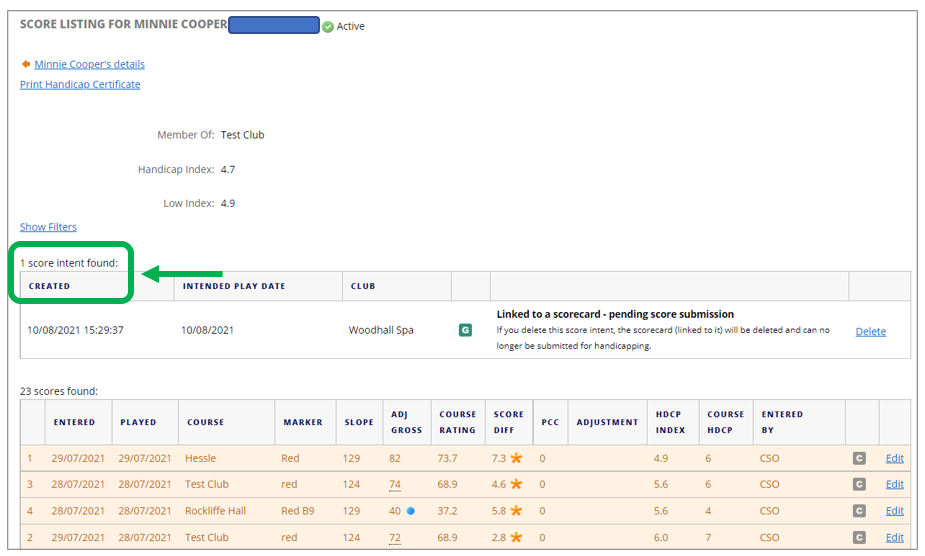
- The score intent will show date ‘Created’, ‘Intended play date’, the ‘Club’ the score intent was created at, and ‘G’ for general play.
- Here is a guide to any text next to a score intent:
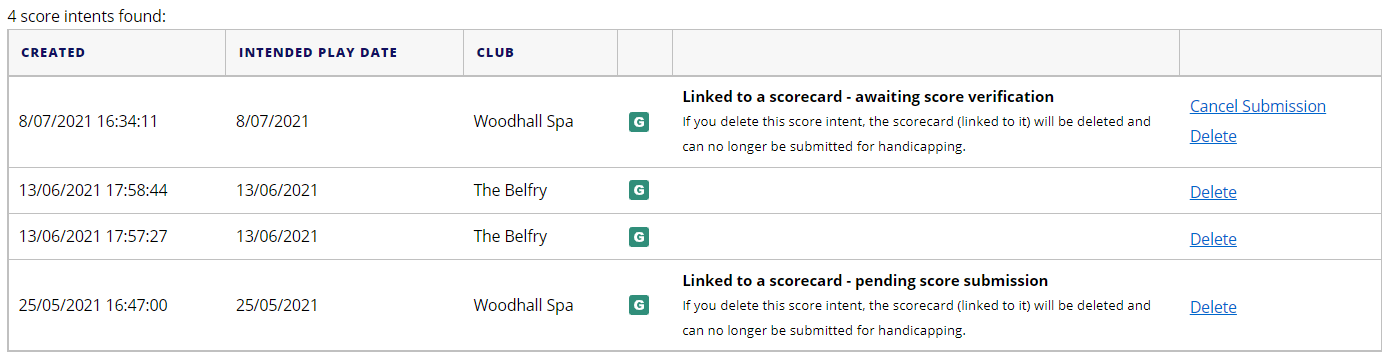
- ‘Linked to a scorecard – pending score submission’ means the scorecard has been created via the MyEG app and has not yet been submitted.
- ‘Linked to a scorecard – awaiting score verification’ means the scorecard has been submitted via the MyEG app and has not yet been verified/attested.
- No text next to the scorecards means the scorecard has been created by a club system/other non EG app/PSI/etc.
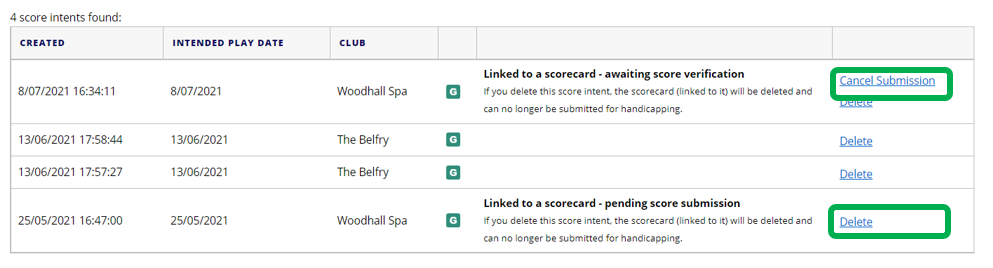
- Here is a guide to any edit options next to a score intent:
- Delete: You can ‘Delete’ any score intent via the delete link next to the score. Note: this will delete the scorecard from the member’s scoring history, and it will no longer be available to submit/edit later or add to the player’s scoring history. When ‘Delete’ is selected the scorecard is deleted from the members’ ‘Enter Score’ area of the MyEG app. Any deleted score intents can be viewed in the report: Reports: Deleted Score Intents.
- Cancel: You can ‘Cancel Submission’ of a score intent which states ‘Linked to a scorecard – awaiting score verification’ for example if the member has selected the incorrect attester or the attester is unable to access the MyEG app to verify the score. When ‘Cancel Submission’ is selected the scorecard is returned as an active scorecard to the members’ ‘Enter Score’ area of the MyEG app for the member to correct and re-submit the scorecard for verification/attestation. Any unsatisfied score intents can be viewed in the report: Reports: Unsatisfied Score Intents.
Was this article helpful?
That’s Great!
Thank you for your feedback
Sorry! We couldn't be helpful
Thank you for your feedback
Feedback sent
We appreciate your effort and will try to fix the article