For approved Tournament Status organisations requests, a club can accept or reject any application via the WHS portal inbox system displayed in the Home tab. A full list of approved organisations can be found via THIS LINK
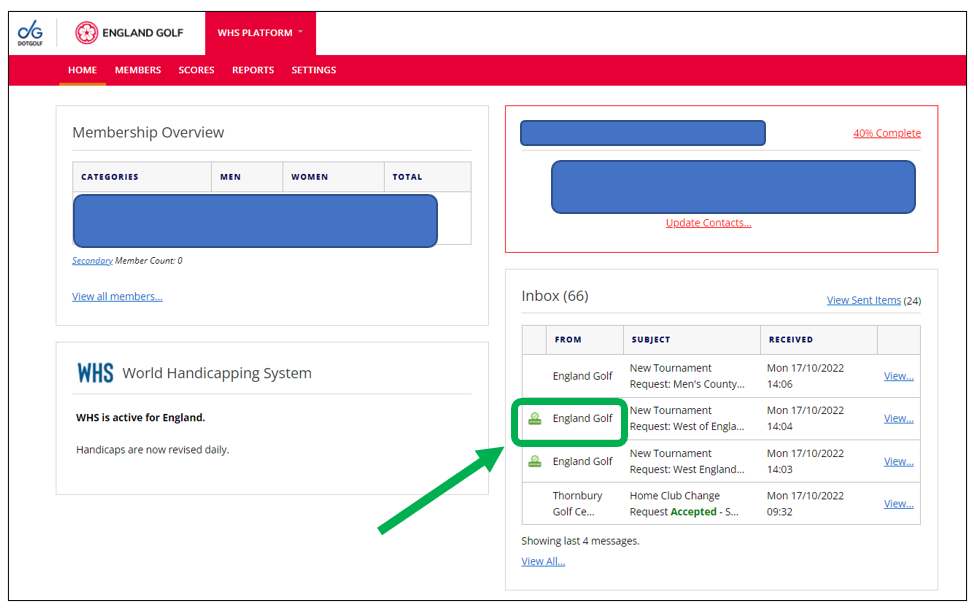
To support the use of the WHS portal clubs can now see via their system inbox, whether a Tournament Host Venue Request email had been approved or declined, or indeed actioned at all.
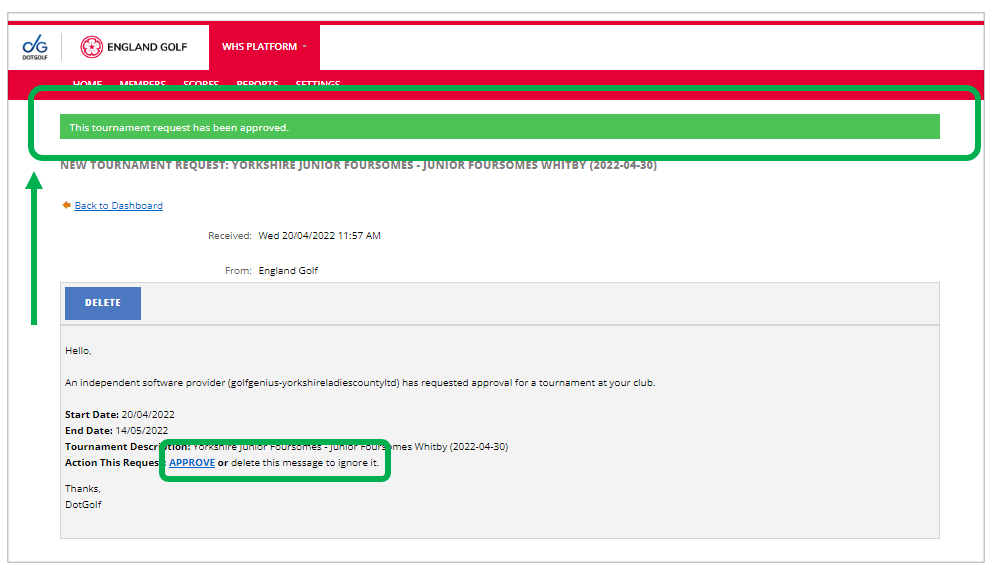
The system inbox now shows a green approved icon next to the email, and clicking through, the full message itself will have a line at the top indicating approval, if that has happened. See screenshots below.
Note there is no ‘declined’ marker, as the tournament request prompts either accept or delete, in which case the request disappears from the inbox. If the email is still present but without the marker/header showing approval, it has therefore not been actioned yet.
The marker and the message header have been applied retrospectively to existing approved requests sitting in club system inboxes and will be applied according to the response on all future requests.
Was this article helpful?
That’s Great!
Thank you for your feedback
Sorry! We couldn't be helpful
Thank you for your feedback
Feedback sent
We appreciate your effort and will try to fix the article